Ransomware Readiness Checklist: Can Your Business Recover Without Paying?
Ransomware is no longer limited to encrypting a few computers. Modern attacks can disable business systems, steal sensitive information, compromise backups, interrupt customer services, and place pressure on organizations through data-extortion threats.
The most important ransomware question is therefore not:
“Can our security tools stop every attack?”
A better question is:
“Can our organization continue operating and recover safely if an attacker gets through?”
Ransomware readiness requires more than antivirus software and occasional backups. It requires asset visibility, access control, continuous monitoring, tested recovery procedures, assigned responsibilities, and clear communication.
As a provider of intelligence-led cybersecurity services, CyberHelm helps organizations connect prevention, detection, response, governance, and recovery into one practical security strategy.
Use the following checklist to assess whether your organization is genuinely prepared.
1. Identify Your Most Critical Business Systems
You cannot protect every system with the same level of attention. Start by identifying the assets your organization needs to continue its essential operations.
These may include:
- Customer databases
- Financial and payment systems
- Email platforms
- Cloud environments
- File servers
- Identity systems
- Manufacturing or operational systems
- Healthcare or patient-management platforms
- Customer-facing applications
- Backup infrastructure
For each critical system, document:
- Its business owner
- Its technical owner
- The information it stores
- The systems connected to it
- The maximum acceptable downtime
- The required recovery order
- The available backup method
This process helps security teams focus their resources on systems that would cause the greatest operational or financial damage if unavailable.
External assets must also be included. CyberHelm’s guide to Attack Surface Management explains how forgotten domains, exposed services, test environments, and unmanaged applications can create entry points for attackers.
2. Reduce Unnecessary User Access
Ransomware often becomes more damaging after attackers obtain an account with excessive permissions.
Organizations should follow the principle of least privilege. Employees, contractors, applications, and service accounts should receive only the access required for their responsibilities.
Review:
- Administrator accounts
- Shared accounts
- Dormant users
- Former employee accounts
- Contractor access
- Remote-access permissions
- Service accounts
- Cloud administrator roles
- Access to backup systems
- Access to sensitive databases
Multi-factor authentication should be applied to email, remote access, cloud platforms, administrative tools, and other critical systems.
A Zero Trust Architecture approach can further reduce ransomware movement by continuously verifying identities, devices, permissions, and access requests rather than automatically trusting users inside the network.
3. Protect Backup Systems From Attackers
Having backups does not automatically mean an organization can recover.
Attackers frequently search for backup systems after entering a network. They may delete backup files, compromise backup administrator accounts, change retention settings, or wait until infected data has been copied into the backup environment.
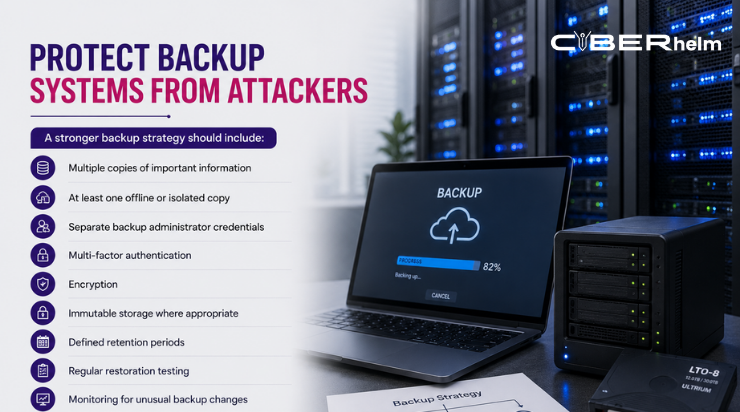
A stronger backup strategy should include:
- Multiple copies of important information
- At least one offline or isolated copy
- Separate backup administrator credentials
- Multi-factor authentication
- Encryption
- Immutable storage where appropriate
- Defined retention periods
- Regular restoration testing
- Monitoring for unusual backup changes
- Clear recovery priorities
The backup environment should not rely on the same identity system and administrator credentials as the production environment.
Most importantly, organizations should test complete recovery rather than simply confirming that backup files exist. A successful test should prove that applications, data, permissions, and dependent services can be restored within the required time.
CISA’s ransomware guidance also emphasizes maintaining offline or protected backups and regularly exercising restoration procedures.
4. Patch Internet-Facing Systems First
Unpatched systems can provide attackers with a direct route into the organization.
Your vulnerability-management process should prioritize:
- Virtual private network systems
- Firewalls
- Remote desktop services
- Web applications
- Email servers
- Cloud platforms
- File-transfer applications
- Identity services
- Public APIs
- Unsupported software
Not every vulnerability carries equal business risk. A critical weakness on an isolated test device may be less urgent than a medium-rated weakness on an internet-facing system connected to sensitive data.
Prioritization should consider:
- Whether the vulnerability is being actively exploited
- Whether the asset is publicly accessible
- Whether authentication is required
- What privileges an attacker could obtain
- Which data or operations are exposed
- Whether other security controls reduce the risk
CyberHelm’s Cyber Solutions support wider visibility into external exposures, threat intelligence, compromised data, and digital risks that may not appear in a traditional internal scan.
5. Monitor for Early Ransomware Warning Signs
Ransomware encryption may be the final stage of an attack rather than the beginning.
Before files are encrypted, attackers may spend time:
- Stealing login details
- Creating new accounts
- Increasing account privileges
- Disabling security tools
- Exploring file servers
- Moving between systems
- Accessing backup platforms
- Downloading sensitive information
- Installing remote-access tools
- Communicating with malicious infrastructure
Security monitoring should therefore look for changes in behaviour, not only known ransomware files.
Useful warning signs include:
- Unusual administrative activity
- Large numbers of failed login attempts
- Access from unexpected locations
- Security tools being disabled
- New scheduled tasks
- Unapproved software
- Sudden archive creation
- Large outbound data transfers
- Changes to backup settings
- Mass file modifications
CyberHelm’s Defensive Security services combine monitoring, threat hunting, investigation, telemetry analysis, and response support to help identify suspicious behaviour before it becomes a widespread incident.
6. Monitor for Exposed Credentials
An organization may secure its internal network while employee credentials are already available to criminals.
Credentials can be exposed through:
- Previous data breaches
- Phishing pages
- Information-stealing malware
- Reused passwords
- Compromised personal devices
- Third-party incidents
- Public data dumps
- Criminal marketplaces
Monitoring for leaked credentials gives organizations an opportunity to reset passwords, revoke active sessions, investigate affected accounts, and strengthen access controls before the information is used.
Dark Web Monitoring can provide early visibility into leaked corporate accounts, stolen customer information, brand impersonation, and threat activity connected to an organization.
Dark-web findings should never remain as reports only. Each alert needs an assigned owner, defined severity level, response deadline, and investigation procedure.
7. Create a Ransomware Incident-Response Playbook
A general incident-response document may not provide enough direction during a ransomware emergency.
Create a dedicated ransomware playbook that defines:
- Who can declare an incident
- Who leads the technical response
- Who can isolate systems
- Who contacts executive leadership
- Who manages legal and regulatory requirements
- Who contacts the cyber-insurance provider
- Who communicates with customers and employees
- Who engages external incident-response specialists
- Who approves recovery decisions
- How important evidence will be protected
The playbook should include specific instructions for:
- Isolating infected devices
- Disabling compromised accounts
- Preserving logs and system images
- Protecting unaffected backups
- Identifying affected systems
- Assessing possible data theft
- Prioritizing business recovery
- Communicating through secure channels
CISA recommends following an approved incident-response plan, identifying affected systems, isolating them quickly, keeping leadership informed, and restoring from protected backups in a controlled order.
8. Define What Employees Should Do
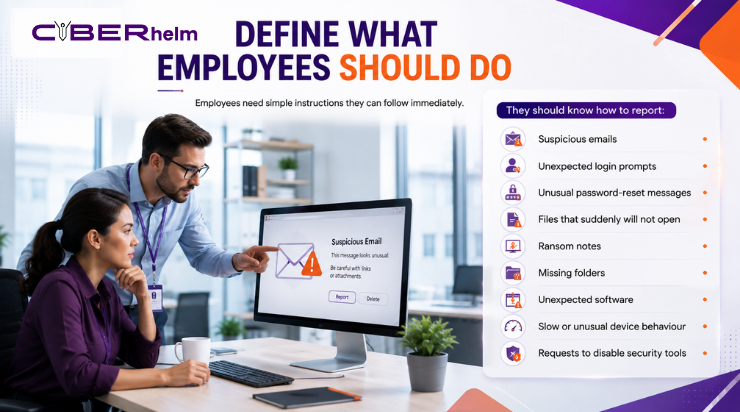
Employees need simple instructions they can follow immediately.
They should know how to report:
- Suspicious emails
- Unexpected login prompts
- Unusual password-reset messages
- Files that suddenly will not open
- Ransom notes
- Missing folders
- Unexpected software
- Slow or unusual device behaviour
- Requests to disable security tools
Employees should also understand what not to do. They should not delete suspicious emails, continue using an infected device, communicate publicly about the incident, or attempt their own technical investigation.
Create one reporting channel that is easy to remember and available even when normal email systems are unavailable.
9. Test the Plan With a Tabletop Exercise
A ransomware plan that has never been tested may fail when it is needed.
A tabletop exercise allows technical teams, executives, legal advisers, communications staff, and business leaders to work through a simulated ransomware incident.
A useful exercise might include the following scenario:
- An employee reports that several files cannot be opened.
- Security monitoring identifies suspicious administrator activity.
- Multiple servers begin encrypting files.
- The backup management account stops working.
- Attackers claim they have stolen customer information.
- A journalist contacts the company for a statement.
- A critical business service becomes unavailable.
- The attackers demand payment within 48 hours.
Participants should explain what they would do, who would make each decision, what information they would need, and how they would communicate.
The exercise should identify:
- Unclear responsibilities
- Missing contact details
- Technical visibility gaps
- Recovery dependencies
- Communication problems
- Legal uncertainties
- Slow decision-making
- Unavailable evidence
The resulting improvements should be tracked through a structured GRC Service programme so ransomware readiness becomes part of wider governance, risk, compliance, and business-continuity planning.
10. Test Whether Your Defences Actually Work
Security policies may appear strong until they are tested under realistic conditions.
Organizations should validate whether an attacker can:
- Obtain employee credentials
- Bypass access controls
- Reach critical systems
- Increase privileges
- Move across the network
- Disable monitoring
- Access backup platforms
- Extract sensitive information
- Maintain hidden access
CyberHelm’s Offensive Security approach uses realistic attack simulation, threat hunting, compromise assessment, and adversary-focused testing to reveal weaknesses that automated scans may miss.
The objective is not simply to produce a list of vulnerabilities. It is to understand how several weaknesses could be combined into a successful ransomware path.
11. Connect Security Readiness With Compliance
Ransomware can create regulatory, contractual, legal, and privacy responsibilities.
Organizations should understand:
- Which information is regulated
- Which customers require incident notification
- Which authorities may need to be informed
- What evidence must be retained
- What cyber-insurance conditions apply
- Which contractual deadlines must be followed
- Who can approve public communication
A passed audit does not guarantee that an organization can contain or recover from ransomware. CyberHelm’s article Compliance Is Not Enough explains why security controls must work in practice rather than exist only in policies and audit evidence.
12. Create a Clean Recovery Process
Recovery should be planned before an incident occurs.
A recovery process should define:
- Which systems must be restored first
- Which backups are approved for use
- How systems will be checked for malicious activity
- When credentials and security keys will be reset
- How restored systems will be separated from affected systems
- Who approves reconnection
- How monitoring will be increased after restoration
- How business teams will confirm that services work correctly
Do not reconnect systems simply because they appear operational. A rushed recovery may reintroduce the attacker or spread ransomware into clean environments.
After recovery, conduct a formal review. Document what happened, which controls failed, what worked, how much downtime occurred, and what must change.
Ransomware Readiness Checklist
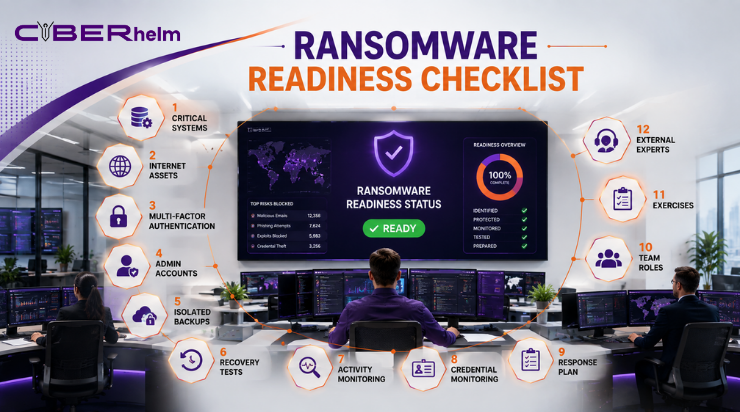
Your organization should be able to answer “yes” to the following questions:
- Do we know which systems are essential to business operations?
- Are internet-facing assets continuously identified?
- Is multi-factor authentication enabled for critical access?
- Are administrator accounts restricted and monitored?
- Are backups isolated from production credentials?
- Have we successfully restored critical systems?
- Can we detect unusual account and file activity?
- Do we monitor for exposed credentials?
- Do we have a ransomware-specific response playbook?
- Does every response participant understand their role?
- Have we tested the plan through an exercise?
- Have our controls been validated through realistic security testing?
- Do we understand our notification responsibilities?
- Can we communicate if normal systems are unavailable?
- Do we have access to qualified external responders?
Every “no” represents a recovery risk that should be addressed before an incident.
Frequently Asked Questions
What is ransomware readiness?
Ransomware readiness is an organization’s ability to prevent, detect, contain, communicate, recover, and learn from a ransomware incident while limiting operational and financial damage.
Are cloud backups enough for ransomware recovery?
Cloud backups can support recovery, but they must be properly configured, protected with separate access controls, monitored, and tested. Attackers may compromise cloud accounts or delete accessible backups.
How often should backups be tested?
Critical backups should be tested regularly according to business risk and recovery requirements. Testing should include complete restoration of systems and data, not only checking whether backup files exist.
Should a business pay a ransomware demand?
Payment does not guarantee that data will be restored, deleted, or kept confidential. The decision also involves legal, insurance, operational, and law-enforcement considerations. Organizations should obtain qualified legal and incident-response advice.
What is the difference between ransomware prevention and readiness?
Prevention aims to stop an attack from succeeding. Readiness assumes an attack may still occur and prepares the organization to contain damage and recover safely.
Conclusion: Prepare Recovery Before the Attack
Ransomware resilience is not created during an emergency. It is built through controlled access, protected backups, continuous monitoring, tested response plans, employee awareness, governance, and realistic security testing.
An organization does not need perfect security to improve its ransomware readiness. It needs clear priorities, assigned ownership, working controls, and proof that critical operations can be restored.
Do not wait for encrypted files to discover that your backups, response plan, or communication process does not work.
Contact CyberHelm to assess your ransomware readiness, identify critical security gaps, and build a defence and recovery strategy aligned with your business operations.